
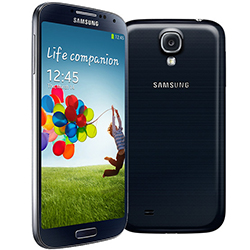
 The Samsung Galaxy S4 is the one-and-only iPhone beater. It has a beautiful 5 inch HD display, a dozen different S software features like Smart Stay, a decent battery life, and expandable storage. Once again, Samsung have shown us how smartphones should be.
If you’re looking to get your Orange Samsung Galaxy S4 unlocked, going straight to Orange will probably be a bad option. It costs a lot, takes time, and forces you to sit and listen through call centers which can prove to be more time consuming than you’d like.
Unlocking your phone can prove to be incredibly handy though, and with plenty of small networks offering amazing deals that can’t be matched with Orange, unlocking may be the only option.
Luckily, SafeUnlockCode can get that done fast and secure with our safe unlocking service! It’s easy to do- and it’s 100% guaranteed to work!
NO technical knowledge needed-
Once you are sent the 8 digit network code and your easy instructions, you will be able to unlock your phone in one or two minutes!
IF the Galaxy S4 isn’t the phone you’re looking for, we also have unlock codes for many other Galaxy line handsets including the Galaxy S, Galaxy S2, Galaxy S3, Galaxy Note and many more!
Important Guidelines
You’ll need to make sure you send all the right information-
1. IMEI number- This can be found by dialing *#06# on your phone or by checking the sticker found underneath the battery. The code should be 15 or 16 digits long and is unique to that handset.
2. Make sure to choose the country your Galaxy S4 is in, as well as Orange as the operator.
We cannot make any refunds if you fail to provide the correct IMEI number. We support the cost for each IMEI we unlock, so make sure you type in the correct code.
Please note that you can’t cancel your order after it has been submitted and it starts the processing service.
Easy Steps to Unlock the Samsung Galaxy S4 on Orange
1. Send us the following:
- The IMEI- Like mentioned before this can be found under your battery or by dialing *#06#
- The country your phone was purchased in.
- The network your phone is currently locked to.
- The email address you’d like the code to be sent to.
2. Check price and availability before proceeding to payment.
3. You will receive an 8 or 16 digit code via email as soon as possible.
4. Unlocking your handset
This is the easy part..
After receiving the code via email, all that needs to be done is for you to insert any non-Orange SIM card into your phone and wait for your phone to display the “Enter unlock code” or “Pin Network Unlock Code” message.
You can now enter the code, and your phone should become unlocked.
In case your phone doesn't ask for the code and there is no designated field to enter it, please contact us for support.
Related news:
- How to Unlock Samsung Galaxy S21
- How to Unlock Samsung Galaxy S10 for At&t, Cricket, T-Mobile, MetroPCS USA
- How to Unlock Samsung Galaxy A8 2018 for T-Mobile USA
- How to Unlock Samsung Galaxy On7 Prime for Canadian Networks
- How to Unlock Samsung Galaxy On7 Prime O2 UK
- How to Unlock Samsung Galaxy On7 Prime T-Mobile USA
Unlock Your Phone Today
Need Help? Contact Us!
Categories
Recent Posts
- How to SIM unlock iPhone 8
- How to Unlock the iPhone 13
- How to Unlock Samsung Galaxy S21
- How to Unlock Samsung Galaxy S10 for At&t, Cricket, T-Mobile, MetroPCS USA
- How to Unlock Xperia XZ Premium AT&T
- How to Unlock Samsung Galaxy A8 2018 for T-Mobile USA
- How to Unlock Samsung Galaxy On7 Prime for Canadian Networks
- How to Unlock Samsung Galaxy On7 Prime O2 UK
- How to Unlock Samsung Galaxy On7 Prime T-Mobile USA
- How to Unlock Samsung Galaxy A8 2018 02 UK
Comments:
Leave Comment: