
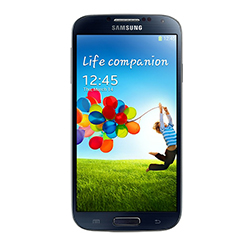
 The Samsung Galaxy S4 is the fastest, smartest, most impressive smart phone yet. It makes use of Samsung’s intuitive TouchWiz UX overlay with its super advanced hardware that can rival most netbooks and some laptops.
Being on Telus can somewhat ruin the experience though, especially when you are paying more money for deals you don’t need. Luckily, there is an alternative.
You can unlock your handset, and this will allow you to use any SIM card on the planet with the Galaxy S4. This means you’ll be able to find a deal that suits you best.
Locked to Telus and want to be able to use your Galaxy S4 on any network across the world? SafeUnlockCode can ensure you a safe and secure unlocking process that’s 100% guaranteed to work- or your money back!
- What’s more is it’s simple to do, and no tech knowledge is needed.
We have a vast library of unlock codes waiting in our A-Z list, so if you want to lock something other than the Galaxy S4, check that out.
Easy Guidelines
You’ll need to send us the following to get started:
1. IMEI number- Dial *#06# to get your IMEI number. This is a unique code that will be needed for the unlock process
2. Country and network- Like your IMEI number, it’s important to know the country your phone was bought from, and what network it is currently locked to, as these are also needed for the unlock process.
You need to be 100% certain that you’ve supplied us the right details and you’ve entered the IMEI correctly (should be a 15 or 16 digit code) because once you’ve submitted your order and it starts processing, we cannot give you a refund.
Steps to follow
Send Us:
- IMEI number
- Country the phone was bought in
- Network the phone is locked to
- Email address so we can send you the unlock code
After you have received the unlock code in your email, you’ll need to insert a non-Telus SIM card and power on your phone. A page should appear on your screen where it’ll ask for an unlock code. You can enter the unlock code we sent you, and your phone should unlock.
Please contact us if the display doesn’t show the contact page or you’re having any other problems with the unlock process.
Related news:
- How to Unlock Samsung Galaxy S21
- How to Unlock Samsung Galaxy S10 for At&t, Cricket, T-Mobile, MetroPCS USA
- How to Unlock Samsung Galaxy A8 2018 for T-Mobile USA
- How to Unlock Samsung Galaxy On7 Prime for Canadian Networks
- How to Unlock Samsung Galaxy On7 Prime O2 UK
- How to Unlock Samsung Galaxy On7 Prime T-Mobile USA
Unlock Your Phone Today
Need Help? Contact Us!
Categories
Recent Posts
- How to SIM unlock iPhone 8
- How to Unlock the iPhone 13
- How to Unlock Samsung Galaxy S21
- How to Unlock Samsung Galaxy S10 for At&t, Cricket, T-Mobile, MetroPCS USA
- How to Unlock Xperia XZ Premium AT&T
- How to Unlock Samsung Galaxy A8 2018 for T-Mobile USA
- How to Unlock Samsung Galaxy On7 Prime for Canadian Networks
- How to Unlock Samsung Galaxy On7 Prime O2 UK
- How to Unlock Samsung Galaxy On7 Prime T-Mobile USA
- How to Unlock Samsung Galaxy A8 2018 02 UK
Comments:
Leave Comment: