
Samsung Galaxy Young Duos Review
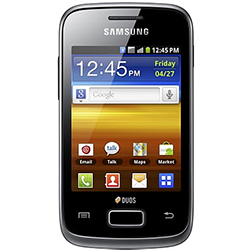 Samsung has brought in the Galaxy Young Duos to offer a low end experience at a decent price. On top of this, the Duos has dual SIM capabilities, making it one of the cheapest dual SIM phones you can get your hands on in the western market.
- The Galaxy Duos comes with a tiny 3.3 inch screen, a 1GHz processor and Android 4.1 Jelly Bean, as well as Samsung’s TouchWiz UX. On top of this, the device has dual SIM capabilities like mentioned before.
Build Quality
The Duos is a plastic handset that manages to feel pretty compact thanks to its small size, and fits comfortably in most hands and although it’s quite a thick phone, this isn’t an issue as the small screen size means you can put your fingers all the way across it no matter how you are holding it.
Just like many other Galaxy handsets, there’s one physical home key in the center underneath the screen, and it is sat in between a capacitive back and menu button. The lock key and volume rocker can be found in the standard position; although there’s no doubt that they could be placed in any area and still be pressed thanks to the Duos small size.
- You can grab the Young Duos in red, white, silver and blue.
Display
- The Galaxy Duos has a beautiful 3.3 inch LCD display with a resolution of 320x480 pixels, giving it a nice 176ppi. Sarcasm aside, the screen is a bit better than low end Android handsets from 2012, however it’s no showstopper, and the pixilation is certainly noticeable in any light.
The colors lack a good contrast, and viewing angles are sub-standard, however for the price, it’s the only thing you’re going to get for a smartphone.
Software
Despite the small size and low price tag, Samsung have still managed to pack the Duos with 4.1 Jelly Bean and TouchWiz Nature UX as well. It doesn’t have as many features as the fully fledged TouchWiz found on the S3 or S4, but it still feels like Samsung, and has many features that make it tick like a Galaxy device should.
TouchWiz also makes sure using dual SIMs is easy by letting you choose what SIMs are capable of doing what, making it perfect for those who have a data SIM as well as a calling and texting SIM.
Hardware
The heavily bloated UX does make it a little laggy though, and this is mainly due to the hardware, which although might be alright for a low end device, it isn’t enough to get you playing any decent games.
- The hardware inside the Young Duos is a 1GHz Cortex A5 processor and 768MB of RAM. It isn’t great, but apart from the slight hiccup here and there due to the overloaded TouchWiz UX, it runs surprisingly well.
- When it comes to storage space, the Duos comes with a measly 4GB ROM, which only 2GB are available to the user. Luckily, like many of Samsung’s Galaxy devices, you can add external memory of up to 64GB through the microSD card slot.
Camera
Unless you’re taking pictures in a decently lit room or out in the sunshine, the Galaxy Young’s 3 megapixel camera is as good as nothing. It doesn’t feature a flash, and even in decent light, pictures still appear blurred and the color range is pretty poor.
The camera is capable of recording 480p, although the frame rate isn’t great and the videos occasionally come out all choppy.
Call Quality
I think we’ve got to a point where most phones, even low end smartphones can perform well when it comes to call quality. There is a bit of muffle for those on the other end of the call, but call quality is still loud and clear most of the time round for both ends of the call.
Battery life
The tiny 3.3 inch screen can make use of the 1300mAh and still last a day at least on average use, and if you ration your battery usage, getting through two days should be a piece of pie.
Summary
For $150, you won’t get all that much better in the western market, and the Galaxy Young Duos has enough to compete with any feature phones or other low end smartphones without going down with a fight. There are areas where it could be improved upon, such as the screen quality and camera, but overall, the phone works well as a basic texting, browsing and calling machine.
Related news:
Unlock Your Phone Today
Need Help? Contact Us!
Categories
Recent Posts
- How to SIM unlock iPhone 8
- How to Unlock the iPhone 13
- How to Unlock Samsung Galaxy S21
- How to Unlock Samsung Galaxy S10 for At&t, Cricket, T-Mobile, MetroPCS USA
- How to Unlock Xperia XZ Premium AT&T
- How to Unlock Samsung Galaxy A8 2018 for T-Mobile USA
- How to Unlock Samsung Galaxy On7 Prime for Canadian Networks
- How to Unlock Samsung Galaxy On7 Prime O2 UK
- How to Unlock Samsung Galaxy On7 Prime T-Mobile USA
- How to Unlock Samsung Galaxy A8 2018 02 UK
Comments:
Leave Comment: